
Kajabi Migration & Redesign: What Actually Happens to Your Website, Courses, Email & Funnels
Aug 25, 2026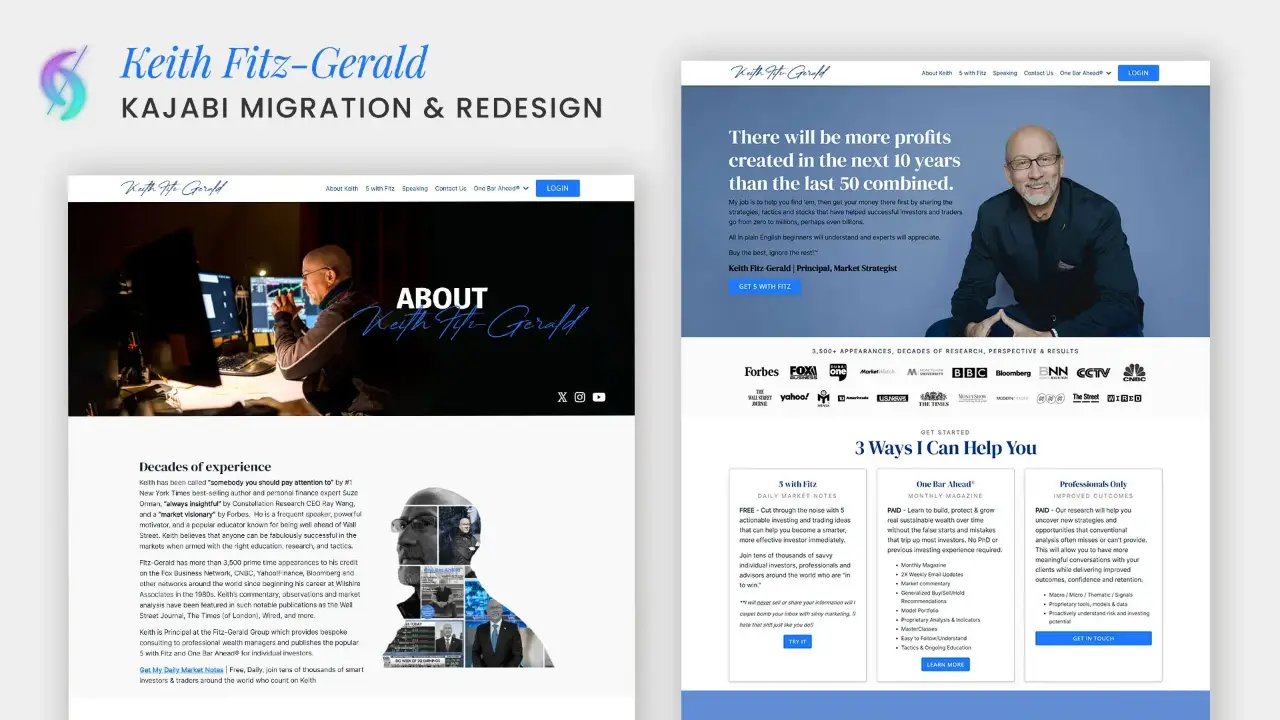

Dianne Empeynado
Vetted Kajabi Expert | Website Designer
Where sleek design meets bulletproof tech & support.
Last updated: September 12, 2026
A Kajabi migration means moving your website, funnels, courses, contacts, and email automations onto Kajabi from another platform. Done correctly, it protects your SEO rankings, preserves your contact list and tags, and handles your active recurring payments carefully, whether they stay on their current processor or migrate directly if you're already on Stripe.
If you're considering moving to Kajabi from WordPress, Wix, Squarespace, Showit, or ClickFunnels, or moving your courses off Teachable or Thinkific, the biggest fear is almost always the same: what happens to everything I've already built?
I've handled complex migrations from all of those platforms, including full website and course consolidations. Here's exactly what a Kajabi migration includes, what to prepare, what stays put, and how to make the move without losing what you've already built.
Key Takeaways
- A full Kajabi migration can include your website pages, funnels and landing pages, contacts, courses, email campaigns, and offers, but not every migration needs all of it.
- Every migration includes a rebuild, and a rebuild is a natural moment to redesign, whether that's because Kajabi is consolidating everything into one platform, or because the old site was already due for a refresh.
- SEO is protected primarily through careful redirect mapping from every old URL to its new Kajabi URL. This is the single most important technical step, and the underlying principle isn't Kajabi-specific; it's how search engines treat any URL change on the internet.
- Live recurring subscriptions generally can't be migrated into Kajabi, with one specific exception: Stripe subscriptions can be migrated directly into Kajabi Payments, since Kajabi Payments runs on Stripe. Outside that exception, subscriptions stay active on their original processor until they naturally end or you transition customers to a new offer.
- Domain integration is a DNS change, not a rebuild. When sequenced correctly, downtime is minimal to none.
- The most common migration fears (losing contacts, breaking automations, losing rankings) are all preventable with the right preparation and process.
Jump to a section:
- What a Kajabi Migration Actually Includes
- Migration and Redesign Often Go Together
- Platforms I Migrate From
- A Top Successful Kajabi Migration
- Why Hire Me as Your Kajabi Migration Expert
- How Migration Affects Your SEO
- What Preparation Is Needed Before We Start
- How Migration Affects Your Domain & Email
- What Happens to Live Recurring Payments
- Common Fears About Migration
- Is Kajabi Migration Easy or Complex? How I Make It Seamless
- The Benefit of Moving to Kajabi
- Common Questions About Kajabi Migration
What a Kajabi Migration Actually Includes
"Migration" means different things depending on what your business actually runs on. A full migration can include:
- Website pages: homepage, about, services, program pages, blog, contact
- Funnels and landing pages: opt-in funnels, sales funnels, application funnels, webinar and event funnels, plus any standalone landing or sales pages outside a funnel sequence
- Contacts: name, email, tags, segmentation, and other custom fields
- Courses and other products: modules, lessons, videos, audios, downloads, quizzes, community, coaching, newsletters
- Email campaigns and automation: sequences, broadcasts, event emails, and automations
- Offers: pricing, coupons, upsells, downsells, order bumps
Not every migration needs every piece. Some clients only need their course content and contacts moved because they're keeping their existing website. Others want a full consolidation: website, funnels, courses, and email all moving to Kajabi at once. Scope gets defined before anything moves, not figured out mid-project.
Migration and Redesign Often Go Together
Migration and redesign aren't always two separate projects. Two things come up constantly with clients moving to Kajabi:
Consolidation is often the whole point. Kajabi's appeal is having your website, funnels, courses, email, and payments in one system. Once that decision is made, most people don't want to rebuild it to look exactly like the fragmented setup they're leaving behind. If the move is already happening, it's the natural moment to also fix a homepage that's stopped representing the business, or update a look that hasn't changed in years.
The old site is already due for a refresh. For a lot of businesses, the real reason they're finally migrating isn't just "I want everything in one place." It's "my current site is outdated, and I've been meaning to rebrand anyway." When both are true, doing them together means one project and one launch, instead of migrating now and redesigning again in six months.
Since a migration already means every page gets rebuilt manually rather than imported as-is, a redesign doesn't add a separate phase of work the way it might on a platform where content transfers automatically. It's often the same project either way, structured around your new brand or a refreshed direction instead of recreating the old design pixel for pixel. Whichever direction you're leaning, whether that's keeping the closest possible match to your current design or building something new from a brand refresh, a Pinterest board, or a Figma mockup, that's part of the same planning conversation.
If you know you want a new look as part of the move, Kajabi website design covers exactly that, alongside the migration itself, whether it makes sense to scope them as one project or two.
Platforms I Migrate From
Every platform hands off content differently, and knowing the quirks of each one is what keeps a migration clean instead of messy:
- WordPress: content, media, and SEO metadata typically export well, but page builder plugins (Elementor, Divi, etc.) don't translate directly, so pages need to be rebuilt natively in Kajabi rather than copy-pasted.
- Wix: no direct export tool for page content, so pages are rebuilt from what's visible on the live site, with careful attention to preserving copy and structure.
- Squarespace: similar to Wix. Content is manually rebuilt, though blog posts tend to export more cleanly than page layouts.
- Showit: pages are rebuilt natively, since Showit's drag-and-drop canvas doesn't carry over to any other platform.
- ClickFunnels: funnels and pages are rebuilt in Kajabi's funnel and page builder, with the funnel logic (order bumps, upsells, downsells) reconfigured natively.
- Teachable: course content, videos, and student data can typically be exported and reorganized into Kajabi's course structure.
- Thinkific: similar to Teachable. Course content moves over, with quizzes and completion tracking rebuilt to match Kajabi's structure.
Across all of them, the constant is the same: content doesn't just transfer. It gets rebuilt intentionally inside Kajabi, which is actually an opportunity to fix what wasn't working before rather than just recreate it as-is.
Ready to move your business to Kajabi without losing what you've already built?
A Top Successful Kajabi Migration
1. Generation Youth | James McLamb
Full Website Migration & Redesign · Repeat Client
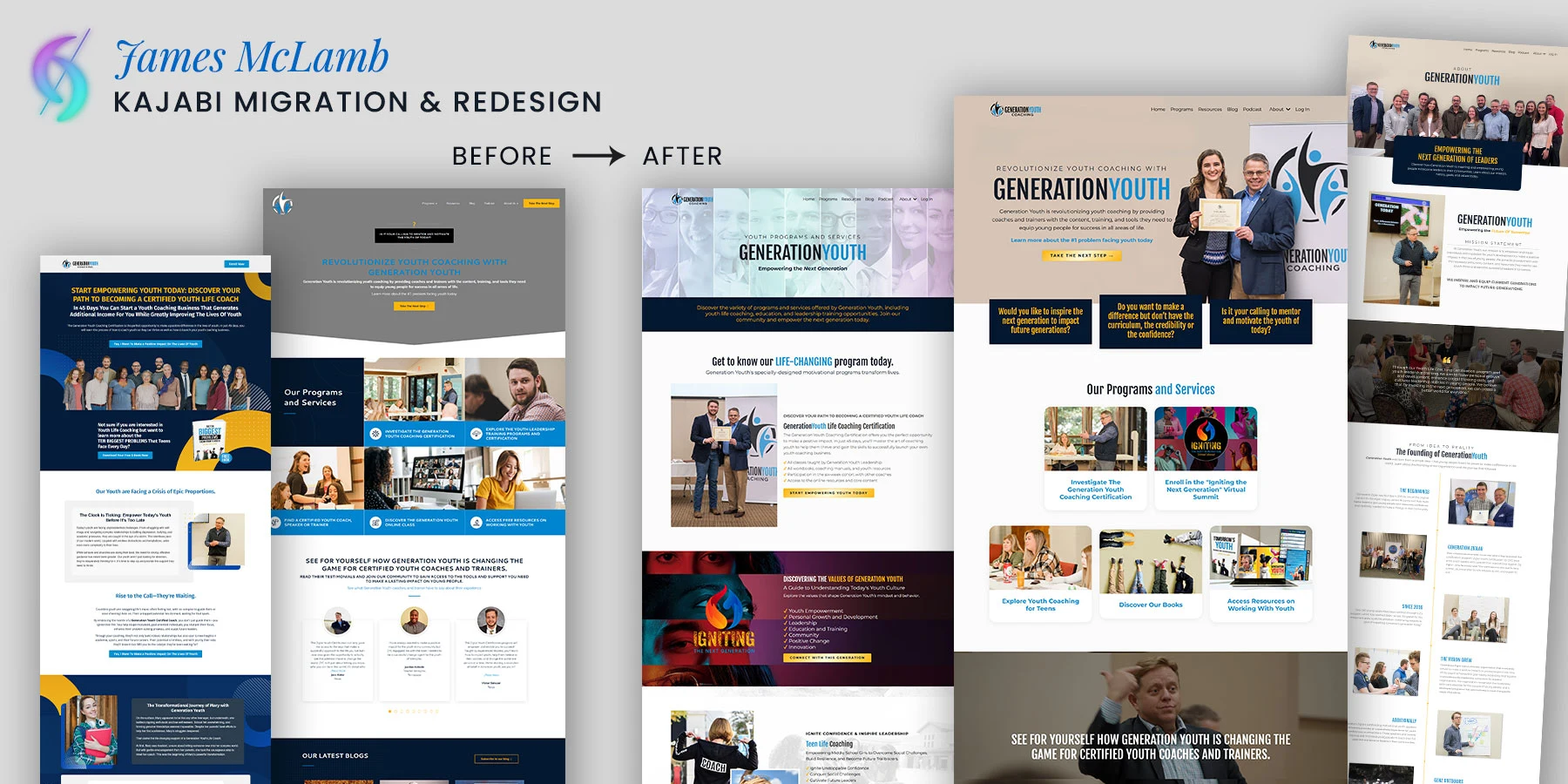
Industry/Niche: Youth coaching and trainer education
Platform migrated from: WordPress (with his podcast and blog previously hosted on separate platforms)
Scope of migration: Full website migration and redesign, plus blog and podcast consolidation onto Kajabi
Outcome: Unified login, single contact list, and one platform replacing three
James came to me through my own website in March 2025. The project was a full migration and redesign, moving his main website off WordPress and consolidating his podcast and blog, which had been spread across separate platforms, into one system on Kajabi. Generation Youth equips coaches and trainers working with young people, and the brand needed to carry the same bold, direct confidence through the redesign that it had before, not get diluted in the move.
What made it a genuine consolidation rather than a lift-and-shift: instead of just recreating what existed on the old platforms, the migration became a chance to unify scattered content into a single, coherent system, with a redesign that reflected where the brand was headed next, not just a like-for-like rebuild of the old WordPress site. One login, one contact list, one place for content that used to live in three.
2. Coaching with Jenny | Jenny Mueller
Full Website Migration & Redesign
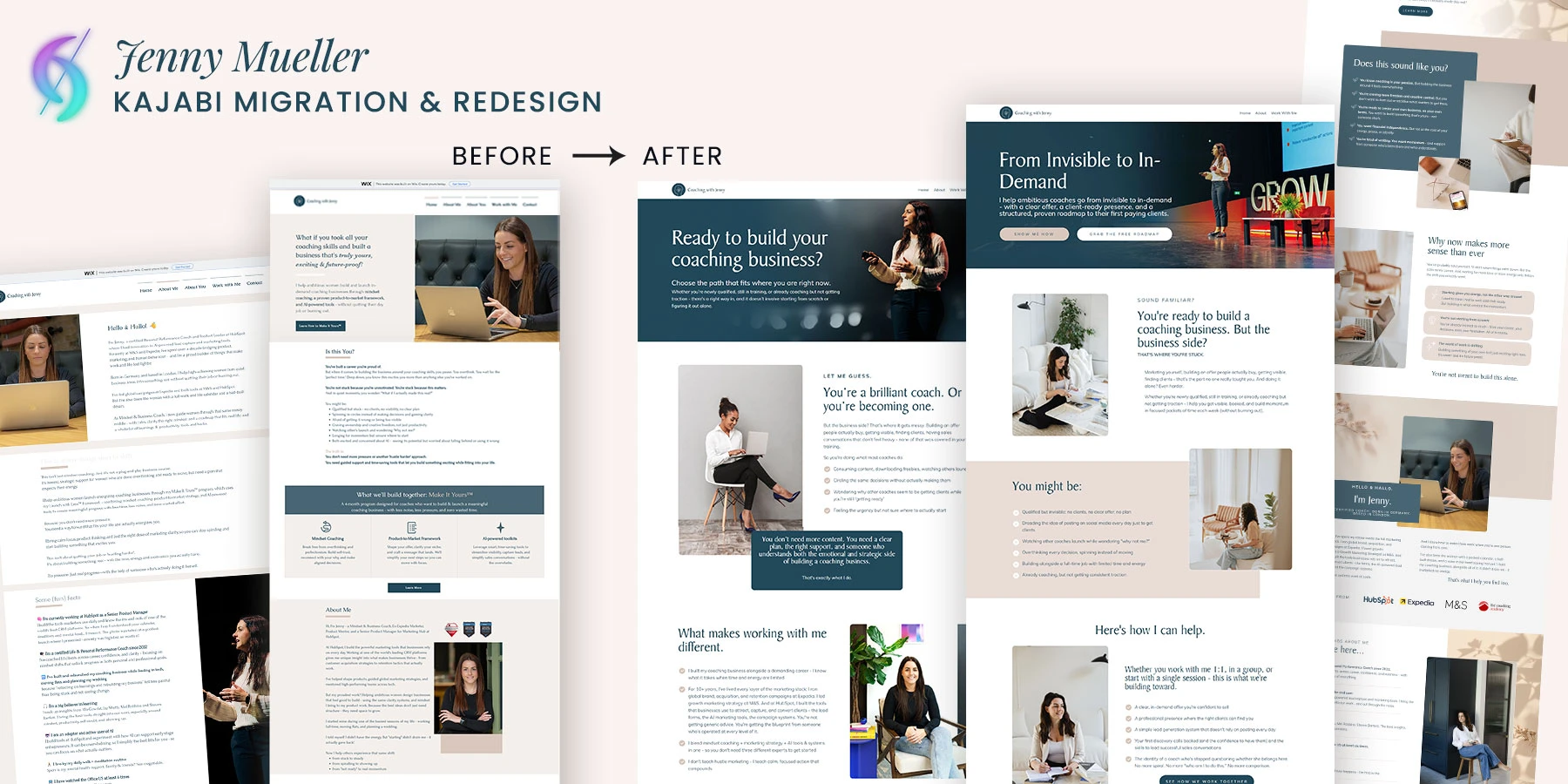
Industry/Niche: Life and wellness coaching
Platform migrated from: Wix
Scope of migration: Full website migration and redesign, Home, a combined About page (merging her separate "About Me" and "About You" pages into one), Work With Me, and Contact, plus her custom email, domain connection, and SEO setup
Outcome: A fully redesigned, SEO-optimized site live on her own domain, with her old Wix pages redirected so none of her existing search traffic was lost
Jenny came to me wanting a refresh of her Wix site inside Kajabi. Early in scoping, she flagged that her site had two separate pages, "About Me" and "About You," that could realistically live as one combined About page, along with a single, focused Work With Me page instead of scattering her offers across multiple pages. Before any design work started, she specifically asked whether redirects for her old Wix URLs, SEO-optimized page titles and meta descriptions, full mobile responsiveness, and connecting her coachingwithjenny.co.uk domain were included, wanting to make sure the SEO she'd already built on Wix wasn't going to take a hit in the move.
Once the new design was live, the work wasn't done: migrating her custom email, setting up DMARC and other DNS records, configuring Cloudflare, submitting the new site to Google Search Console for reindexing, transferring her cookie consent banner over to CookieYes, and embedding her Instagram feed into the new site. None of these are things a client typically thinks to ask for individually, but together they're exactly what makes a migration feel genuinely complete, rather than just "the pages are live."
"This was my first experience with Fiverr. I was using Wix for my website and needed a refresh inside of Kajabi. Dianne went above and beyond. The design is so beautiful, there's no way I could have created it myself. She is such a kind and highly professional partner, I will forever be grateful for her. Thank you so much for everything, Dianne!! You're a superstar and saved me soooo much work and just made it all better!"
— Jenny Mueller | Growth Marketing Strategist
3. Keith Fitz-Gerald
Full Website Migration & Redesign
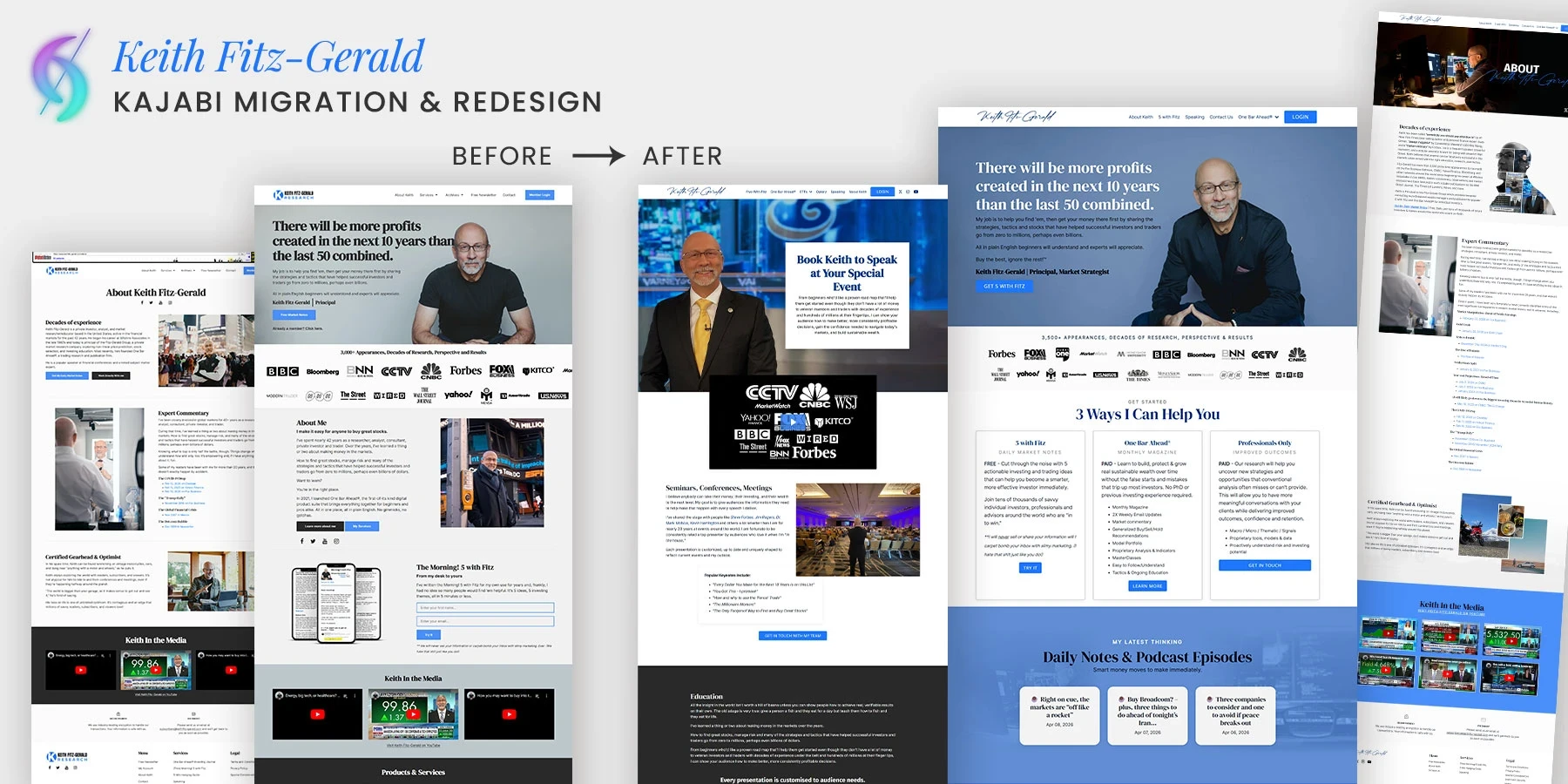
Industry/Niche: Financial markets research and trading education
Platform migrated from: Shopify
Scope of migration: Full website migration and redesign, including 148 existing blog posts moved with their original URLs kept fully intact
Outcome: A redesigned, professional site on Kajabi with existing SEO equity fully preserved, since none of his 148 blog URLs changed
Keith came to me wanting to move his website off Shopify and onto Kajabi, with a specific direction for the redesign: keep the same professional, trustworthy feel his brand already had, just cleaner and easier to navigate, not a reinvention. That's a different brief than most redesigns, which usually start from "this doesn't represent us anymore." Here the existing style was already working; the goal was refinement, not a departure from it.
The biggest technical piece was his blog: 148 existing posts that needed to move over without losing the search rankings and traffic they'd already earned. Rather than remapping every post to a new URL structure, the slugs were kept identical on the new Kajabi site. That's the cleanest possible outcome for a migration's SEO: when a URL doesn't change at all, there's nothing to redirect, and nothing for search engines to re-evaluate as "moved." All 148 posts carried their existing rankings straight over.
"Dianne did a wonderful, professional job. She listened very carefully to what we needed, made excellent suggestions... then rapidly completed the project. We can't wait to work with her again."
— Keith Fitz-Gerald | Private investor, trader and Market Strategist
4. Veritas Botanica | Caitlin Woolery
Full Website Migration & Funnel Sequence
Industry/Niche: Botanical / herbal wellness
Platform migrated from: Wix
Scope of migration: Full website migration and funnel sequence build, moved from Wix to Kajabi
Outcome: A resolved Wix technical issue that had been blocking the business, plus a new website and funnel sequence live on Kajabi
Caitlin came to me needing both a new website and a funnel sequence built, moving her business off Wix and onto Kajabi. Partway through, an existing technical problem on the Wix side surfaced, the kind of issue that, left alone, would have turned into a real headache for her business. Rather than treating it as a separate, unrelated fire to put out, it got folded into the migration itself: diagnosed, resolved, and accounted for as part of moving everything over cleanly.
That's often what separates a migration that goes smoothly from one that doesn't: technical problems on the old platform don't just disappear when you move, they need to be understood and resolved as part of the process, not left for the client to untangle on their own afterward.
"I had the pleasure of working with Dianne who is incredibly talented, who created a website and a funnel sequence for me, and I cannot praise her work enough. From start to finish, the experience was nothing short of exceptional! Her expertise and passion for her craft were evident in every aspect of the project. Working with her was an absolute pleasure. She brought my vision to life in a way that exceeded my expectations! If you are looking for someone who is not only a master at their craft but also a joy to collaborate with, I wholeheartedly recommend her. I am thrilled with the final product and can confidently say that she is a true professional and a genius!
Dianne is an artist as well as a genius when it comes to the tech. The design was superb, she collaborated brilliantly with my vision and feedback. We had technical problems with Wix and she knew exactly what to do to troubleshoot and problem solve what otherwise would have been a nightmare for me and my business. I trust her 100% with everything. She communicated above and beyond and was patient with my annoying and juvenile questions!"
— Caitlin Woolery, Veritas Botanica
Why Hire Me as Your Kajabi Migration Expert
Migrating an existing business onto Kajabi means every piece: website, funnels, contacts, courses, and automations, needs to move without breaking. Here's what that experience is built on:
- Kajabi insider experience: I spent 3 years on Kajabi's own Technical Support and VIP Implementation team before building a single site for a client. One of my primary responsibilities there was migrating close to 100 courses into Kajabi, so I know exactly how the platform's backend handles data imports and structure, not just the front-end design.
- Proven track record: 1,100+ completed Kajabi projects, a 5.0 rating on Contra, and a #1 ranking in the official Kajabi Expert Directory before it closed and migrated to Contra.
- Kajabi-vetted, not self-appointed: Kajabi itself vets me as an Expert. This isn't a self-issued title.
- System-level thinking: I treat migration as a system move, not a copy-paste job. Your website, funnels, product setup, and automations get connected intentionally, not just recreated separately.
- Peer-vetted standard: Member of the Experts Circle, a peer-vetted network of Kajabi professionals, so the standard I'm held to isn't just my own.
How Migration Affects Your SEO
This is the part people worry about most, and it's fair to worry. A mishandled migration absolutely can hurt rankings. A well-handled one shouldn't, and the reasoning behind that isn't specific to Kajabi at all.
Why this is a general rule, not a Kajabi rule. Search engines evaluate URLs, content, and links independently of whatever platform is hosting them. Moving from WordPress, Squarespace, or Wix to Kajabi changes your content management system, but the underlying rules of web crawling stay exactly the same. A redirect from the old URL to the new one is required to pass ranking signal safely for any URL change on the internet, regardless of which platform you're moving to or from. Google's own documentation on site moves with URL changes confirms this: the guidance applies to any site move, not to one platform over another.
Redirect mapping. Every existing URL on your old site needs a precise, one-to-one mapping to its new Kajabi URL with a proper redirect in place. This tells search engines "this page moved, send the ranking signal to the new address" instead of letting the old URL 404 and lose its value. Creating that URL map before the old site goes offline, not after, is what prevents 404 errors during the switch.
Think of it like a mail-forwarding address. When you move, you don't just abandon your old address and hope people figure it out. You file a forwarding order, so anything sent to the old address still finds its way to you at the new one. A redirect does the same job for a URL: it tells search engines and visitors "this moved here now," so nothing sent to the old address gets lost along the way. In practice, that starts as a spreadsheet: every old URL on one side, its exact new Kajabi URL on the other, mapped one-to-one before the switch happens, not figured out after the fact.
What that spreadsheet actually looks like:
| Old URL | New Kajabi URL | Redirect Needed? |
|---|---|---|
| yourcustomdomain.com/services | yourcustomdomain.com/services | No, slug kept identical |
| yourcustomdomain.com/blog/5-tips-for-your-launch | yourcustomdomain.com/blog/5-tips-for-your-launch | No, slug kept identical |
| yourcustomdomain.com/work-with-me | yourcustomdomain.com/kajabi-website-design | Yes, redirect required |
Swipe left/right to see the full table on mobile.
When the slug carries over exactly, as in the first two rows, the URL doesn't change at all, so there's technically nothing to redirect. That's the ideal outcome, and it's why keeping URL slugs consistent wherever possible (see below) reduces how much redirect work a migration needs in the first place. But it's rarely possible for every single page: sometimes a page gets renamed, restructured, or consolidated into a different URL as part of the move, like the third row above. Every one of those changed URLs needs its own redirect, mapped individually, so the ranking signal follows the page to its new address instead of getting lost at the old one.
One practical note on how these redirects actually get set up: Kajabi doesn't have a built-in redirects settings panel the way some platforms do. Redirecting a page inside Kajabi is a manual process, done by adding a small piece of code, either through a Custom Code Block added directly to the old page, or, on Kajabi's Pro plan, through the Code Editor's global snippet. Either way, the code sends a visitor's browser to the new URL once the old page loads (a script like window.location.href = "https://www.example.com";). This is a client-side redirect, not a true server-side 301 like the kind referenced in Google's documentation above, so it's a different technical mechanism, though search engines can generally still follow it and update their index accordingly. See Kajabi's own guide on how to redirect a page for the exact steps. Because it has to be set up manually, page by page, mapping everything out before launch (rather than patching it in afterward) is what keeps this from turning into a scattered cleanup job once the old site is already offline.
Beyond redirects, my migration checklist also covers:
- Metadata retention: existing meta titles and descriptions are extracted and placed natively into Kajabi, preserving the keyword context those pages already earned instead of starting from zero
- URL consistency: keeping URL slugs consistent wherever possible, so redirects are cleaner and fewer
- Semantic hierarchy: rebuilding proper heading structure, a single
<h1>tag per page, followed by clean, nested<h2>and<h3>tags, since not every old platform enforced this well - Accessibility preservation: image alt text carried over, protecting both image search indexing and ADA compliance, not lost in the rebuild
- Sitemap re-submission: once the migration goes live, a fresh XML sitemap is submitted through Google Search Console to speed up how quickly search engines recrawl and re-index the new URLs
Short-term ranking fluctuation, typically a few weeks, is normal during any platform migration while search engines recrawl your pages, and this isn't platform-specific either: it happens whether you're moving to Kajabi, WordPress, or anywhere else. What proper redirect mapping prevents is permanent loss, not the natural re-indexing window that follows any site move.
What Preparation Is Needed Before We Start
The smoothest migrations happen when this groundwork is in place before anything moves. None of it has to be perfectly organized before reaching out, helping you pull this together is part of the process, but knowing what's needed upfront is what keeps things fast and clean:
- A full content audit: a master list of every page, post, and asset on the current site, so nothing gets missed or forgotten
- Contact list export: a clean CSV export with existing tags, segments, and custom fields clearly documented, not just a raw email list
- Course content inventory: modules, lessons, video files, downloads, and quiz structure
- Video asset inventory: platforms like Teachable and Thinkific host your videos natively, and there's no simple way to bulk-download the original files straight from their dashboard. Before an old account gets closed, it's worth checking whether the raw video files already live somewhere accessible, like Google Drive or Dropbox, or whether a bulk media export needs to be requested from the old provider first, since losing access to the original files is a lot harder to fix after the fact than before.
- Automation and sequence mapping: a list of active automations and what triggers them, for example "if tag X is applied, send email Y," so nothing silently breaks
- Legal and compliance pages: your exact privacy policy, terms of service, and purchase agreements need to carry over word for word, not get paraphrased along the way. Kajabi has dedicated places for these in your footer and checkout settings, and getting the exact language in place before launch is what keeps things compliant from day one, not something to patch in later.
- Tracking pixels and integrations: your Google Analytics 4 measurement ID, Meta Pixel, and any Google Tag Manager containers, documented ahead of time so they can be added into Kajabi's own integration settings before the new site goes live, rather than pieced back together after launch.
- Offer and pricing inventory: every product, coupon code, upsell, downsell, and payment plan currently live
- Domain and DNS access: login access ready ahead of the cutover date
- A realistic timeline: migrations aren't instant, and rushing the audit stage is where most mistakes happen
A pro tip worth planning ahead for: a migration announcement email to your list. Before the new site goes live, send your existing members and customers a heads-up that a migration is happening. One well-timed email does a lot of work: it gives them the new site URL and login page, tells them where to find their library (the place inside the new Kajabi site where every offer, course, or product they've purchased or been granted access to will show up), and sets the right expectation about course progress specifically, that they won't need to re-enroll or repurchase anything, since their access carries over and is simply granted inside the new site. A little advance notice here is what keeps members from feeling lost, confused, or suspicious the moment something looks different, and it heads off a wave of "did I lose access?" messages after launch.
The more of this that's ready ahead of time, the faster and cleaner the migration moves.
How Migration Affects Your Domain & Email
Your domain doesn't need to change. It gets pointed to Kajabi instead of its old host through a DNS update, not a rebuild of your domain itself, and you retain full ownership of your URL throughout.
The general sequence: the new Kajabi site is built and tested first on Kajabi's own temporary staging URL, the free .mykajabi.com subdomain every Kajabi site starts with before a custom domain is connected. Once everything on that staging URL is reviewed and approved, only then is your actual domain's DNS repointed to Kajabi. Because the new site is already built and tested on that .mykajabi.com address before the domain switches, downtime is minimal to none. DNS changes can take anywhere from a few minutes to up to 24 to 48 hours to fully propagate globally, so there can be a short window where some visitors briefly see the old site and some see the new one, but the site itself doesn't go dark.
Email deliverability deserves its own attention if your email sending is also moving. This is where DMARC, DKIM, and SPF records come in: these are the DNS records that tell inboxes your emails are legitimately coming from your domain, and they need to be updated alongside your domain's other DNS settings when email moves to Kajabi. Skipping this step is one of the more common reasons emails suddenly start landing in spam right after a migration, not because anything about the email content changed, but because the sending domain's authentication wasn't updated to match. This gets sequenced carefully alongside everything else, rather than flipped all at once.
What Happens to Live Recurring Payments
This is one of the most misunderstood parts of migration, so it's worth stating plainly: in most cases, active recurring subscriptions cannot be migrated into Kajabi. If a customer is currently being billed on a recurring basis through a processor other than Stripe, or through a Stripe account you don't plan to connect to Kajabi Payments, that subscription stays exactly where it is. It keeps billing on its original schedule, on its original processor, uninterrupted.
The one specific exception: Stripe subscriptions. Kajabi Payments runs on Stripe under the hood, so if your existing recurring subscriptions and payment plans are already on Stripe, Kajabi has a specific, supported path to migrate those active or trialing subscriptions directly into Kajabi Payments, rather than leaving them stranded on the old system. This is a specialized exception to the general "subscriptions can't be migrated" rule, and it applies specifically to Stripe-based subscriptions moving into Kajabi's own Stripe-backed payment system, not to subscriptions on other processors like PayPal. See Kajabi's guide on migrating Stripe subscriptions and payment plans to Kajabi Payments for the exact steps and eligibility requirements.
For everything outside that specific Stripe-to-Kajabi-Payments path, here's what actually happens during migration:
- Existing recurring subscriptions continue running on their current payment processor, untouched
- New offers are set up in Kajabi for new customers going forward
- Existing customers can be given access inside the new Kajabi platform, including courses, community access groups, coaching, and any other Kajabi products included in your migration scope, without being re-charged, while their billing stays on the original processor
- Over time, as those existing subscriptions naturally end, renew, or convert, new customers move onto Kajabi's native checkout
Outside the specific Stripe exception above, this isn't a limitation of the migration process. It's how payment processors generally work, regardless of platform. Understanding which category your subscriptions fall into upfront prevents a surprise later.
Common Fears About Migration
"I'll lose my contacts." Contacts, tags, and segments are exported and re-imported deliberately, with tags mapped over so your segmentation isn't lost.
"My automations will break." Automations are rebuilt natively in Kajabi and tested before anything goes live, not assumed to "just work."
"I'll lose my SEO rankings." This is what careful redirect mapping exists to prevent (see the SEO section above). Some short-term fluctuation during re-indexing is normal, on any platform; permanent loss is what proper redirects prevent.
"My course progress data will disappear." To be direct about this one: your students' course progress from the old platform (Teachable, Thinkific, WordPress LMS plugins, etc.) does not carry over to Kajabi. There's no native way to import "percent complete" or lesson-completion data from another platform into Kajabi's own member progress tracking. The course content itself (modules, lessons, videos) moves over and gets rebuilt, but each student's progress on that content starts fresh once they're set up in Kajabi. This is worth planning around before launch: for instance, communicating the reset to students directly, or manually marking specific lessons complete for members who are further along, so no one feels like they're starting the course over from lesson one.
"My site will go down." Because the new site is built and tested before the domain switches, downtime is minimal to none.
"It'll feel like starting over." It shouldn't. A good migration should feel like your business got a system upgrade, not a demolition.
Is Kajabi Migration Easy or Complex? How I Make It Seamless
Honestly, it depends on scope. Moving just your course content and contacts is relatively straightforward. Migrating a full website, funnels, courses, and email automations from multiple platforms at once is genuinely complex, and anyone who tells you otherwise is underselling what's involved.
What makes it seamless isn't pretending it's simple. It's sequencing:
- Audit: everything on the old platform(s) gets documented before anything moves
- Build on staging: the new Kajabi site, funnels, and courses are built and tested on the .mykajabi.com staging URL before your domain or contacts touch it
- Review: tested line by line, checked against the audit, nothing assumed
- Cutover: DNS repointed, redirects go live, contacts imported, at a planned time with minimal disruption
- Post-launch check: monitoring for crawl errors, broken links, and anything that needs a small fix once real traffic hits it
One thing worth knowing upfront: Kajabi doesn't have a native plugin or one-click tool to import a theme or page design from another platform. Every page is rebuilt manually inside Kajabi: new sections and blocks added, images re-uploaded, styling matched by hand, regardless of which platform you're migrating from. That's factored into how a migration timeline is scoped from the start.
That sequencing is what turns complex into seamless: not skipping steps, but doing them in the right order so nothing gets discovered after it's already broken.
The Benefit of Moving to Kajabi
Most migrations to Kajabi aren't about Kajabi being prettier. They're about consolidation. Here's what's typically missing from the platforms people migrate away from:
- From WordPress: no more stitching together a page builder plugin, a separate LMS plugin, and a separate email tool that don't fully talk to each other.
- From Wix and Squarespace: these are website builders, not business platforms. There's no native course delivery, funnel logic, or advanced automation.
- From Showit: beautiful design, but no built-in courses, funnels, or automation. It's typically paired with a separate course and email platform, which Kajabi consolidates into one.
- From ClickFunnels: strong for funnels specifically, but not built for full course delivery or a complete website presence the way Kajabi is.
- From Teachable and Thinkific: solid for course hosting, but limited (or nonexistent) website, funnel, and email automation capability, meaning a separate site and email tool is usually still needed alongside it.
- From Shopify: excellent for selling physical or digital products in a storefront, but not built for course delivery, membership content, or a service-based business's website. Migrating from Shopify to Kajabi is common for coaches, consultants, and educators who started with a commerce-first platform but need a content-and-community-first one instead.
- From AWeber, Mailchimp, and other standalone email platforms: these handle email sending well, but they're not built for course delivery, funnels, or a full website presence. It's common to see a business running email through one of these tools while paying separately for a website builder and a course platform on top of it. Kajabi replaces all of it with one system, so email, contacts, and automations live in the same place as the website and courses they're supporting, instead of three logins and three separate bills.
The common thread: most other platforms do one piece well and leave you stitching the rest together with third-party tools. Kajabi's advantage is having your website, funnels, courses, email, and payments in one system, which is also exactly why the migration itself matters: done right, it's the last time you have to consolidate anything.
Common Questions About Kajabi Migration
Does migrating to Kajabi include a redesign? Effectively, yes. Kajabi has no native tool to import a theme or page design from another platform, so every migration involves rebuilding pages by hand, which naturally opens the door to a redesign at the same time, whether that means matching your current look as closely as possible or moving to a fresh brand direction.
Does Kajabi have a built-in 301 redirect feature? No. Kajabi doesn't have a native redirects settings panel. Redirecting a page is done manually with a small code snippet, either through a Custom Code Block on the page or, on the Pro plan, through the Code Editor's global snippet, which sends visitors to the new URL once the old page loads. It's a client-side redirect rather than a true server-side 301, and it has to be set up individually for each page being redirected. See Kajabi's own redirect guide for the exact steps.
Can you migrate a website from Shopify to Kajabi? Yes. This typically comes up when a coach, consultant, or educator started on Shopify for its e-commerce strengths but has outgrown it for content delivery, courses, or a service-based website. If you have existing blog content on Shopify, keeping the URL slugs identical on the new Kajabi site (rather than remapping them) is the cleanest way to bring your existing search rankings over intact, since there's nothing to redirect when a URL doesn't change at all.
Should I email my list before migrating to Kajabi? Yes, this is one of the most overlooked steps in a migration. A single announcement email before launch, covering the new site URL, the login page, where to find their library of purchased or granted offers, and reassurance that no re-enrollment or repurchase is needed, prevents confusion and support requests once the new site goes live.
If someone who has already purchased from me visits the new Kajabi website, logs in, accesses their product, makes a payment, or contacts me for support, will their experience continue without confusion or interruption? In most cases, yes, when the migration is set up correctly. Their course, community, or product access is granted inside the new Kajabi site without being re-charged. Login is set up fresh in Kajabi, so they'll typically get an email to set a new password the first time. Any active recurring payment stays on its original processor and keeps billing normally, unless it's a Stripe subscription being migrated directly into Kajabi Payments (see the payments section above). And if they run into anything unexpected, having a support plan in place, whether that's you personally, or ongoing Kajabi Virtual Assistant support handling day-to-day questions after launch, is what keeps a small hiccup from turning into a lost customer.
Will I lose my SEO rankings when I migrate to Kajabi? Not permanently, if every old URL is mapped correctly to its new Kajabi URL with a redirect in place. In fact, the safest approach of all is keeping URL slugs completely unchanged wherever possible, since a URL that never changes has nothing to redirect and nothing for search engines to re-evaluate. Some short-term fluctuation during search engine re-indexing is normal and expected, and this applies to any platform migration, not just Kajabi.
Can my recurring subscriptions be migrated into Kajabi? In most cases, no. Active recurring subscriptions stay on their original payment processor and continue billing there, with new offers set up in Kajabi for new customers going forward. The one exception is Stripe: if your subscriptions are already on Stripe, Kajabi has a supported path to migrate them directly into Kajabi Payments, since Kajabi Payments runs on Stripe under the hood.
Will my students' course progress carry over to Kajabi? No. Progress tracking (percent complete, lesson completion) from a previous platform like Teachable, Thinkific, or a WordPress LMS plugin does not transfer into Kajabi. The course content itself moves over, but each student's progress starts fresh once they're migrated. Communicating this to students ahead of time, or manually marking lessons complete for members who are further along, are common ways to handle it smoothly.
How long does a Kajabi migration take? It depends entirely on scope. A course-and-contacts-only migration moves faster than a full website, funnel, and course consolidation. A specific timeline is given after the audit stage, not before.
Will my site go down during migration? Downtime is minimal to none when the new site is built and tested on Kajabi's .mykajabi.com staging URL before the domain is repointed. DNS propagation can take up to 24 to 48 hours, during which some visitors may briefly see the old site.
Will my emails end up in spam after migrating? Not if DMARC, DKIM, and SPF records are updated alongside the domain's other DNS settings when email moves to Kajabi. Skipping this authentication step, not anything about the email content itself, is the most common reason deliverability drops right after a migration.
Can you migrate from more than one platform at once? Yes. Consolidating a website from one platform and courses from another into a single Kajabi account is common, and often the whole point of migrating.
What happens to my email list and tags? Contacts are exported with their existing tags and segments, then re-imported into Kajabi with that structure preserved, not just as a flat email list.
Do I need to prepare anything before reaching out? No. A content and contact audit is part of the process. It helps to have login access to your current platforms ready, but the audit itself doesn't need to be done by you first.
What if I only want part of my business migrated, not everything? That's common. Scope is defined upfront based on what you actually need moved, whether that's just courses, just the website, or a full consolidation.
What if I need support after the migration is done? Ongoing Kajabi Virtual Assistant support is available for exactly this: handling small fixes, member questions, and day-to-day maintenance after launch, so support doesn't just stop the moment the site goes live.
Ready to Migrate to Kajabi Without the Guesswork?
A migration doesn't have to mean starting over or gambling with your SEO, your contacts, or your existing customers' billing. Let's map out exactly what needs to move, what stays put, and how to get there without disruption.
Start your Kajabi migration →, explore a redesign alongside it, or if you're looking for ongoing help after launch, see what Kajabi Virtual Assistant support covers.
Related Reading
- How to Choose the Right Kajabi Expert (And What to Ask Before You Hire)
- Best Kajabi Website Designs in 2026: Real Examples of What Actually Works
- What Makes a Custom Kajabi Website Actually Custom (And Why It's Not Just Design)
The Author
Dianne Empeynado is a Kajabi Website Designer and vetted Kajabi Expert known for designing across a wide range of styles: feminine, modern, minimalist, editorial, bold, professional, corporate, and everything between, with every site structured around how the business actually works, not just how it looks. She's been working with Kajabi since 2017, and was formerly on Kajabi's own Technical Support and VIP Implementation team, so every design she builds is backed by platform-level technical accuracy most designers don't have, including complex platform migrations, advanced automation builds, and conversion-focused funnel architecture that generalist designers typically don't take on. She was ranked the #1 Kajabi Expert in Kajabi's official Expert Directory before it closed and its network migrated to Contra. For projects that need deep copywriting or brand messaging strategy, she partners with trusted specialists from her Kajabi Experts Circle rather than stretching outside her lane.
That combination of real design range, structural thinking, and technical depth is why she's a top-rated Kajabi specialist on Contra, a Fiverr Vetted Pro, available on Upwork, and a member of the Experts Circle, a peer-vetted network of Kajabi professionals.
What began as a solo website design business has become a creative studio, built to support creators through more stages of their business while keeping the same thoughtful, personal approach that's always mattered.
See the range for yourself in the portfolio, or start your Kajabi project here.